
Nova Mind for Windows
Installation Instructions
- 1 Open the downloaded
nova-mind-latest.exefile - 2 If Windows SmartScreen appears, click "More info" then "Run anyway"
- 3 Follow the installation wizard steps
- 4 Launch Nova Mind from the Start menu or Desktop shortcut
Windows SmartScreen Warning
Since Nova Mind is a new application, Windows SmartScreen may display a security warning. This is normal for recently published software. The application is signed with a code signing certificate from Digital Cookie SAS, guaranteeing it is free of malware.
Step 1: Click "More info"
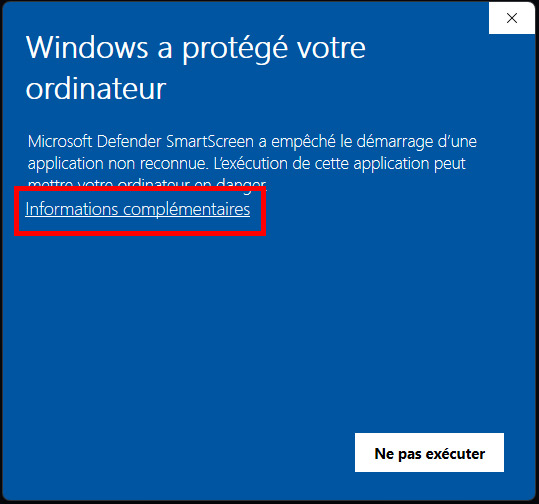
When this screen appears, click on "More info" to reveal additional options.
Step 2: Click "Run anyway"
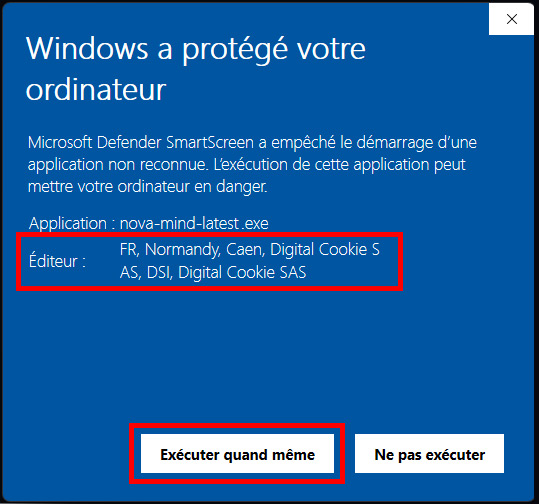
You can verify the publisher is Digital Cookie SAS, then click "Run anyway" to proceed with installation.
System Requirements
- • Windows 10 or Windows 11 (64-bit)
- • 4 GB RAM minimum
- • 500 MB available disk space
- • Internet connection for synchronization