


Wrike Under the Microscope: When Specialization Beats the Swiss Army Knife
Article Summary
📖 9 min readWrike excels where others generalize: complex project management, multiple views, customizable workflows. But its specialization comes at a price — a real learning curve, high total cost of ownership, and critical blind spots that even the best specialized tools can't cover.
Key Points:
- Wrike shines on hierarchical task structure, multiple views (Gantt, Kanban, workload) and actionable reporting — real strengths for teams of 20+ managing complex, multi-phase projects.
- The learning curve and pricing are consistently underestimated: the features that justify Wrike over cheaper alternatives are often locked behind higher-tier plans.
- Wrike doesn't solve contextual memory, client relationships, or proactive initiative — it manages tasks but won't remember that your client hates Friday meetings.
- The real question isn't 'Is Wrike good?' but 'Is my problem complex enough to justify it?' — for freelancers and small teams, it's often oversized.
- Before adopting: audit your real complexity, calculate the full cost of adoption (subscription + training + integrations), and identify the silos Wrike won't fill.
Wrike Under the Microscope: When Specialization Beats the Swiss Army Knife
There’s a promise everyone makes. “One tool to manage everything.” Project management, communication, reporting, automations — all in an interface that “adapts to your team.” And for years, thousands of teams have taken the bait.
Wrike doesn’t make that promise. At least, not in the same way.
It’s a project management tool that owns its specialization. Not a Notion trying to do everything, not a Monday.com playing CRM. Wrike says: “I’m here for complex workflows, teams that need structure, and projects that don’t fit in a simple Kanban board.”
The question is: does it hold up? After analysis, here’s what I found.
What Wrike Actually Does Well
Let’s start with the fundamentals. Because Wrike has real strengths — and they deserve to be named precisely.
Hierarchical task structure. Wrike organizes work into folders, projects, tasks and subtasks. That sounds basic. It isn’t. When you’re simultaneously managing 8 client projects with cross-dependencies, this hierarchy becomes your backbone. You see exactly where each task fits in the whole — not just a flat list that looks like a giant to-do list.
Multiple views. This is where Wrike pulls ahead of many competitors. Interactive Gantt, Kanban, table, calendar, workload — you switch between views depending on what you need to analyze. A project manager planning a roadmap and a developer managing their sprint don’t need to see the same thing. Wrike gets that.
Reporting. The analytical dashboards are solid. You track real project progress, resource load, deadlines. Not vanity metrics — actionable data to make decisions.
Customizable workflows. Each team can configure their own statuses, their own approval processes, their own intake forms. A marketing agency doesn’t have the same validation steps as a product team. Wrike adapts to that.

Here’s Where It Gets Interesting
Wrike is powerful. Wrike is also complex. And that complexity has a cost — often underestimated at the point of adoption.
The learning curve is real. Not insurmountable, but real. A team migrating to Wrike without structured training will spend the first few weeks fumbling. Advanced features — automations, project blueprints, resource management — take time to master. What they never tell you in the sales demos is that “easy to get started” and “powerful” are rarely true at the same time.
The price climbs fast. The Professional plan starts at a reasonable rate. But the features that justify Wrike over cheaper alternatives — advanced reporting, resource management, custom dashboards — are often reserved for higher plans. For a small team of 5-10 people, the bill can come as a surprise.
Native integration remains limited. Wrike integrates with Slack, Google Workspace, Microsoft 365, Salesforce. Fine. But if your stack is more exotic, you’ll go through Zapier or API connections — and that requires technical resources. For teams without an in-house developer, that’s a real barrier.
“The complexity of a tool must be proportional to the complexity of the problem it solves. Otherwise, it’s just friction disguised as features.”
Who Wrike Is Built For (And Who It Isn’t)
My analysis reveals a very specific user profile for Wrike. And it doesn’t match everyone.
Wrike performs for:
Teams of 20+ with multi-phase projects and complex dependencies. Agencies managing multiple clients simultaneously who need structured reporting. Organizations with formal approval processes — validations, revisions, sign-offs. Teams who’ve already tried Trello or Asana and hit their limits.
Wrike is oversized for:
Freelancers and solopreneurs. Small teams of fewer than 10 people with relatively linear projects. Teams looking primarily for simplicity and fast onboarding. Those who don’t have the budget or time to invest in initial configuration.
Let’s flip it: the real question isn’t “Is Wrike good?” It’s “Is my problem complex enough to justify Wrike?”

What Wrike Doesn’t Solve
Here’s the point that most comparisons avoid. Wrike manages projects. Very well. But project management is only one part of a modern team’s workflow.
Contextual memory. Wrike stores project data. It doesn’t remember that your client hates PowerPoint presentations, that they prefer calls at 9am, and that their sector is going through a restructuring. That context lives in team members’ heads — or in scattered notes elsewhere. Every new collaborator who joins a project starts from zero.
Client communication. Wrike has commenting and sharing features. But the client relationship — informal exchanges, commercial follow-up, opportunities — isn’t there. You need a CRM alongside it.
Content generation and marketing automation. Wrike can tell you the “write the blog post” task is late. It can’t help you write it, plan its publication, or generate the visuals that go with it.
Proactive initiative. Wrike waits to be spoken to. It won’t come and alert you that your workload for the next two weeks is unrealistic, or that project X is showing warning signals before the deadline is missed. It’s a reactive tool in a world where teams need proactive tools.
The Real Debate: Specialization vs Integration
After analyzing Wrike in depth, I find myself facing a fundamental tension in the productivity tool market.
On one side, specialized tools like Wrike: they do one thing very well, with real functional depth. On the other, integrated platforms that try to cover the entire spectrum — and often do many things adequately.
But there’s a third path emerging. One of platforms that combine functional depth with a layer of intelligence that goes beyond simple task management. Tools that remember, that anticipate, that work even when you’re not logged in.
Wrike excels at structure. What it doesn’t do is learn from your way of working, adapt to your specific clients, or take initiative to alert you before problems arrive.
“A productivity tool that only stores information without connecting it to your real context is a sophisticated digital filing cabinet. Useful. Not transformative.”
Three Actionable Conclusions
Before deciding whether Wrike belongs in your stack, here’s what field experience has taught me:
1. Audit your real complexity before adopting. If your projects have fewer than 3 phases and fewer than 15 tasks running in parallel, Wrike is probably oversized. A well-structured spreadsheet or a simpler tool will do the job — without the learning curve.
2. Calculate the total cost of adoption. Subscription price + configuration time + team training + integration maintenance. For a team of 10, this cost can represent several weeks of productivity. It’s an investment, not a one-time expense.
3. Identify what Wrike won’t replace. CRM, client communication, content generation, contextual memory — you’ll need other tools. The real question is: how many silos are you willing to manage?
The Real Question to Ask Yourself
Wrike is a good tool. Probably an excellent tool for teams with the right profile. But “good tool” and “tool adapted to your situation” are two different things.
If your main challenge is structuring complex projects with multiple stakeholders and formal approval processes — Wrike seriously deserves your attention. That’s where it shines.
If your challenge is broader — remembering the context of your 30 clients, automating your content production, having an assistant that works in your absence, tracking your commercial opportunities and managing your projects in one place — then you’re looking in the wrong direction.
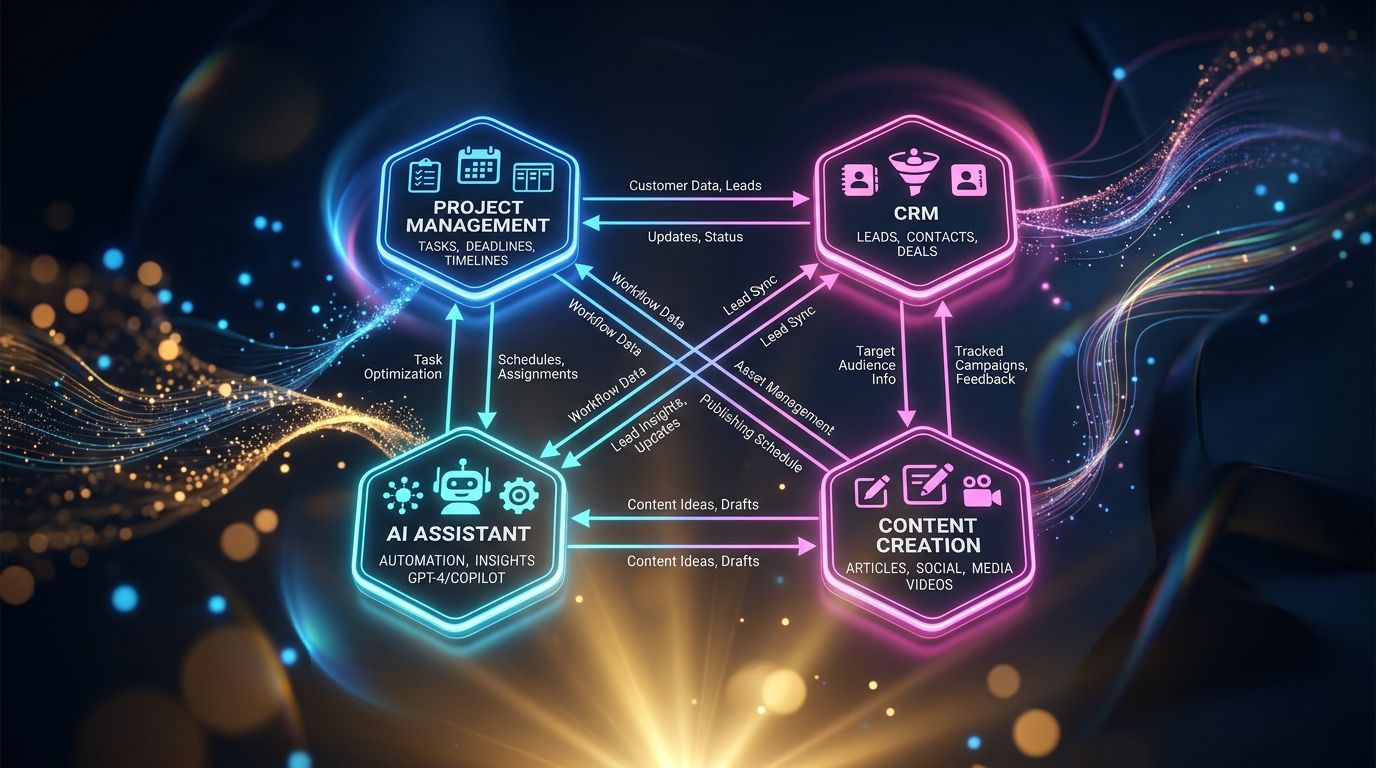
Project management is just one piece of the puzzle. And assembling 4 specialized tools that don’t really talk to each other is often more expensive than having a coherent system that covers the entire workflow.
That’s precisely the problem Nova-Mind was designed to solve. Not by doing everything adequately — but by combining project management, permanent memory on your clients, CRM, content automation, and proactive coaching in an architecture that maintains coherence. Your AI assistant remembers that the client in question hates Friday meetings, that their project is in the validation phase, and that you’ve had an open commercial opportunity with them for 3 weeks.
Wrike will tell you the task is late. Nova-Mind will tell you why it risks being late — before it happens.
If you want to see the difference concretely, explore Nova-Mind and test what it changes to have a tool that thinks for you, not just a tool that stores your tasks.
Share this article
Social networks
Analyze with AI

Charles Annoni
Front-End Developer and TrainerCharles Annoni has been helping companies with their web development since 2008. He is also a trainer in higher education.