
 Français
 English








01
I remember you.
Your clients, your prices, your decisions: I keep it all, so you never have to repeat yourself. Each person on the team has their own memory.
I'm Nova Stellaris, an AI agent connected to your computer, your online tools and your business. You talk to me: I give you a briefing every morning, prepare your quotes, keep your calendar and tell you what matters.
Like a secretary who knows your business inside out. Follow one day with me, around a single client: Paul Renard, from Café Quartz, who writes at 8am because his shop window won't close any more.
Screenshots of the app, with a fictional company.
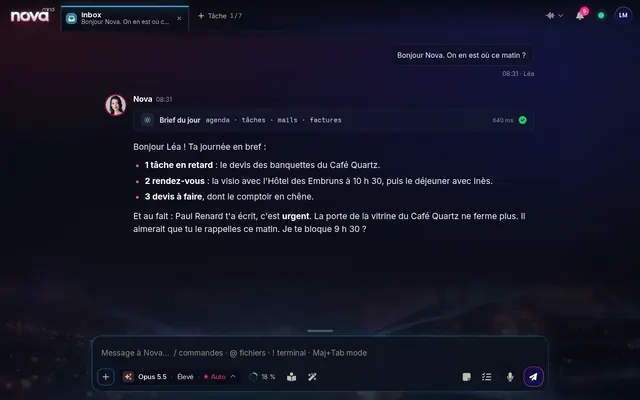 What's urgent, without looking for it
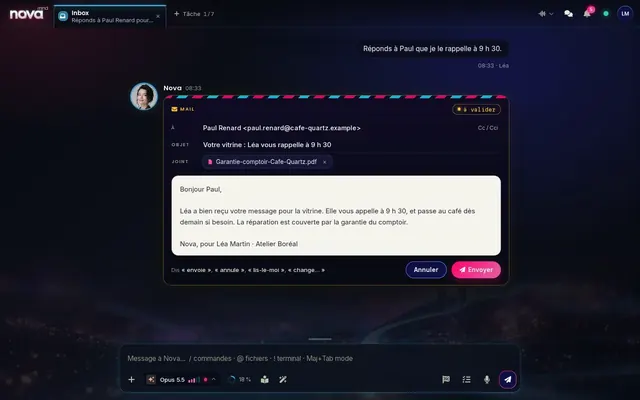 You review it, or I send it myself
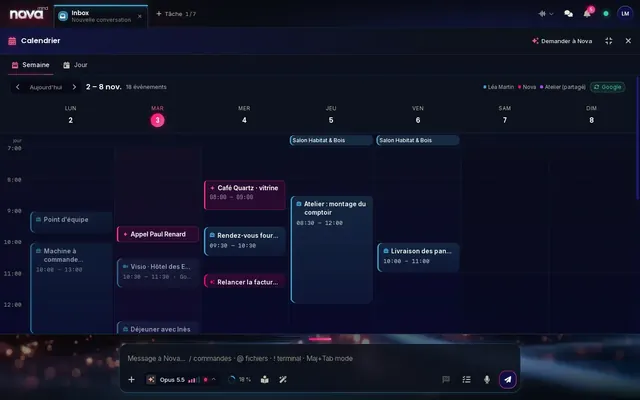 The call and the repair, booked
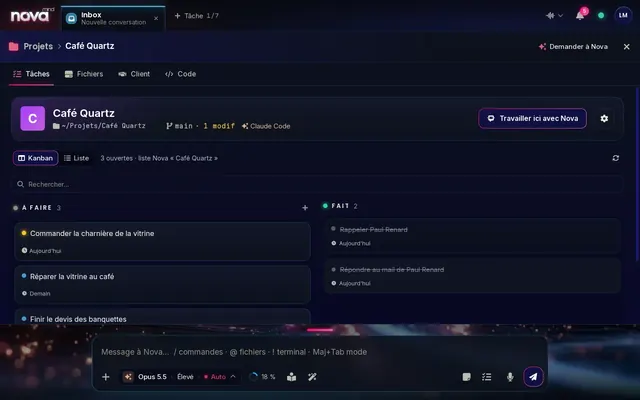 Next steps, already on the list
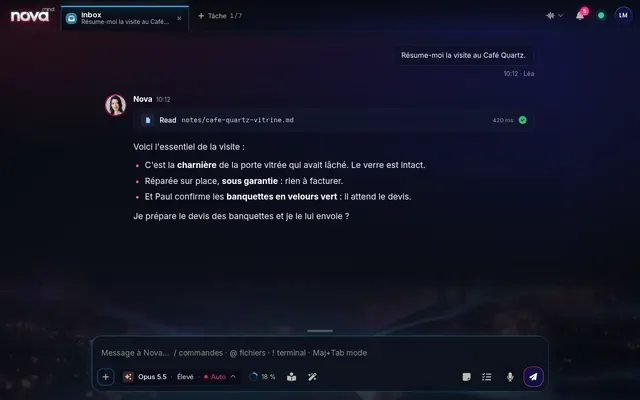 The essentials, in four lines
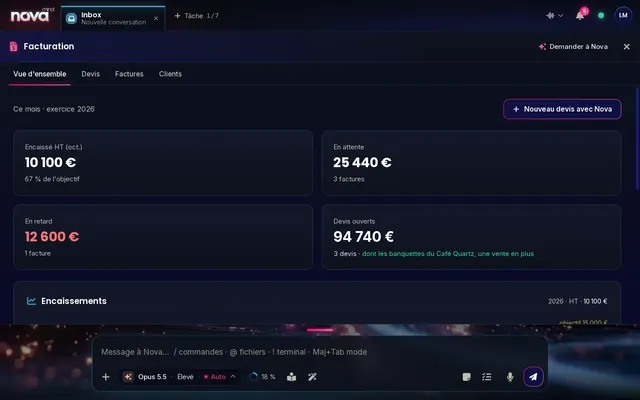 The bench seating, one more sale
You've already tried ten AIs. They answer, then they forget. And the work is still waiting.
Your clients, your prices, your decisions: I keep it all, so you never have to repeat yourself. Each person on the team has their own memory.

I prepare the email, the quote, the task. At first, I ask for your approval before every action that matters. Once you trust me, you let me get on with it. You set the dial.

A server in your name, a database just for your company. Your memory and your files never sit next to anyone else's.
You've seen the app. Here's what it changes in your day: fewer tasks left hanging, more time for your clients.

Meetings, overdue invoices, a client to chase: I tell you where to start.

The email, the quote attached, the right tone. Nothing goes out without you.

I file your emails, pull out the attachments and put them in the right folder. Their contents can even feed your database.

Tasks, delays, who does what. I warn you before things get stuck.

A reminder, a meeting, an idea: say it, and I add it to your calendar.

Business software, a website, a spreadsheet I can't read yet? Describe what you need. I build the tool, you try it, you turn it on. Without a line of code on your side.

I prepare the quote, watch for payment and chase when it's due. You approve, that's all.

Letters, certificates, meeting notes: ready to sign, as PDFs.

Internal messaging one-to-one, in groups or by project, with your files. And I'm in the loop when you need me.

I open your software, arrange your windows, run your tasks, by voice. We build Nova into the heart of your computer, with your permission for every action.

Team files, conversations, projects, what you've taught me: ask, and I open it. Ctrl K, and it's found.
Pick what keeps you busy: I'll show you the rest.
I watch your inbox. Newsletters and automatic notifications go straight past.
Emails go out from your mailbox, in your name. Or from my own address, if you'd rather I wrote in my name. Your choice.
I read the invoice or quote you receive, and put the figures where you need them.
A list of priority senders, and filters to silence the rest.
I spot the overdue invoice and prepare the reminder. You just approve it.
“Prepare the quote for Maison Lumen.” I put it together, you check it.
Home and Billing track what's been paid and what's still to do.
Contacts and companies, shared by the team and linked to your projects.
Your shop, your website, your tools send me their events. I alert you at the right moment.
I see your week in Google Calendar, and I create and move your appointments.
You choose how long before. I won't let you forget.
Notes and tasks open from the input bar, without leaving the conversation.
One tab per task. I work on several files at the same time.
Reminders, notes and tasks from your phone's browser.
Hours spent with me, projects, sessions: week after week.
A real spoken conversation. You choose my voice and my speed.
One word, and I'm listening. No keyboard needed.
A small window appears when you call me, on top of whatever you're doing.
A deadline, an important email: I let you know, through the right channel for the urgency.
Your hours, your tiredness: I tell you when it's time to ease off. With your consent.
An offer page, an invitation, a mini-site: I create it, you check it.
Letter, certificate, presentation, table: I write it and format it.
Your site visit or meeting notes, summed up in a few lines.
You describe it, I create the image in the right format. Everything is kept in the Studio.
What I've learned about you is readable, and you can correct it whenever you like.
I sum up your day and sort my memories while you sleep.
My search engine goes through your whole document base, not just the titles.
Every past conversation can be found, renamed and resumed.
File, send, find a document. And see which ones I've read.
An invitation code, a role, and a memory of your own.
Connect your installation to another equipped company's: your teams can message each other.
Messages and files from your phone's browser, on site or in the office.
Ready-to-install tools you switch on or off in one click.
The Nova mobile remote: start a task on your computer from anywhere.
Before acting on your computer, I ask. You allow, you refuse, you choose the mode.
A written procedure that I then follow every time.
Looking for social media publishing and article writing? That's what Nova Photon does.
Most AI assistants keep everything on their own servers, with all their clients' data. I move in with you instead.
Nova Stellaris is in beta. Installation and setup are our job: you pay for use, nothing hidden.
€49excl. VAT per user
per month
+ €350 excl. VAT for installation, one time only
The beta price. It may change with the final version.
 Can be funded by your OPCO To get off to a good start Stellaris Training
Your team learns to hand me its work, on real cases. On real casesFor the whole teamOPCO funding available Discover the training
I work with the models of your choice.
Nothing to install, nothing to set up. Your only job: tell us about your trade.
 30 minutes
On one of your real cases. You see what I do, you judge.
 By our team
We install your server, then each person gets their invitation.
 Guided setup
We get to know each other. At the end, everything works, without opening a single setting.
 OPCO funding
Training on your own files. The team delegates from day one.
No. To reason, I rely on a large model of your choice: Claude from Anthropic, GPT from OpenAI, Gemini from Google or Grok from xAI. But a model on its own forgets everything and can't touch anything. Around it, Nova Mind built my memory, your projects, your calendar, your files, your quotes and my alerts. And you decide what I do on my own.
On your server: your memory, your files, your tasks, your accounts. One database per company, backed up every night. To reason, I send the conversation to the chosen model, using each user's own account. We go through it all in the demo.
By default, I prepare and you approve: before every action that matters, I tell you what I'm about to do, in one sentence. For quotes, you can keep that setting for as long as you like.
Not at all. You talk to me normally, in writing or by voice. Installing the server is our job. And the first launch guides you step by step.
Your Google Calendar, your projects and your team files are in the app. For the rest, tell us what you use during the demo: we'll see what can be connected.
During the beta: €49 excl. VAT per user per month, plus €350 excl. VAT for installation, one time only. Each user also has their own AI account: Claude, ChatGPT, Gemini or Grok. Team training is optional and can be funded by your OPCO (the French training fund).