


AI Memory: Why Claude Forgets Everything (And How I Fixed This Problem)
Article Summary
📖 10 min readThis article explains why LLMs have zero memory between sessions — an architectural choice, not a bug — and how to build a persistence layer with pgvector and vector embeddings. It details the MCP protocol that allows Claude Desktop to query this memory in real time, quantifies the concrete gains (4 hours/week recovered), and lists the three classic mistakes that cause DIY AI memory attempts to fail.
Key Points:
- Professional AI users lose an average of 12 to 18 minutes per day rebuilding context — over 75 hours per year
- pgvector + embeddings enable semantic search (by meaning, not keywords) that injects the right context at the right time
- The MCP protocol transforms Claude Desktop from a chatbot into a contextualized collaborator with 36 integrated tools
- Across 10 active clients, persistent memory saves approximately 4 hours per week — 2 working days per month
- The three fatal mistakes: storing without structuring, neglecting updates, confusing vector memory with context overload
You’re tired of re-explaining who your client is
Every Monday morning. Same scenario. You open Claude, ask a question about an ongoing project — and realize you have to re-explain everything from scratch. The client, the context, the constraints, the communication tone. Again.
It’s not a bug. It’s a fundamental architectural limitation of LLMs. Claude, ChatGPT, Gemini — none of them remember you from one session to the next. Zero. Every conversation starts from scratch, as if you were meeting for the first time.
For a freelancer managing 15 active clients, or an agency with 40 simultaneous projects, it’s a real friction. Measurable. Costly.
Here’s what I’ve observed: on average, professional AI users spend 12 to 18 minutes per day rebuilding context in their conversations. Over a week, that’s at least 1.5 hours. Over a year? More than 75 hours lost explaining what the AI should have already known.
I fixed it. Here’s how.
Why LLMs have no memory — and why it’s a deliberate choice
This is where it gets interesting. The zero memory of LLMs isn’t a design oversight — it’s an architectural decision.
Language models work with a context window: a fixed amount of tokens they can process at once. Claude 3.5 Sonnet handles up to 200,000 tokens in a single window. Impressive. But that window closes as soon as the session ends. Everything vanishes.
Why not just keep everything? Two major technical reasons.
First, computational cost. Injecting thousands of context tokens into every request, for every user, in every conversation — it’s economically unviable at the scale of a mass-market SaaS service.
Second, privacy. Storing personal conversations on third-party servers raises legitimate GDPR concerns. Zero memory is also a form of data protection.
The problem: you’re the one paying the price.
Let’s flip the situation. If the model can’t remember, the solution isn’t to ask it to memorize — it’s to build an external memory layer that injects the right context at the right time.
That’s exactly what a vector database does.
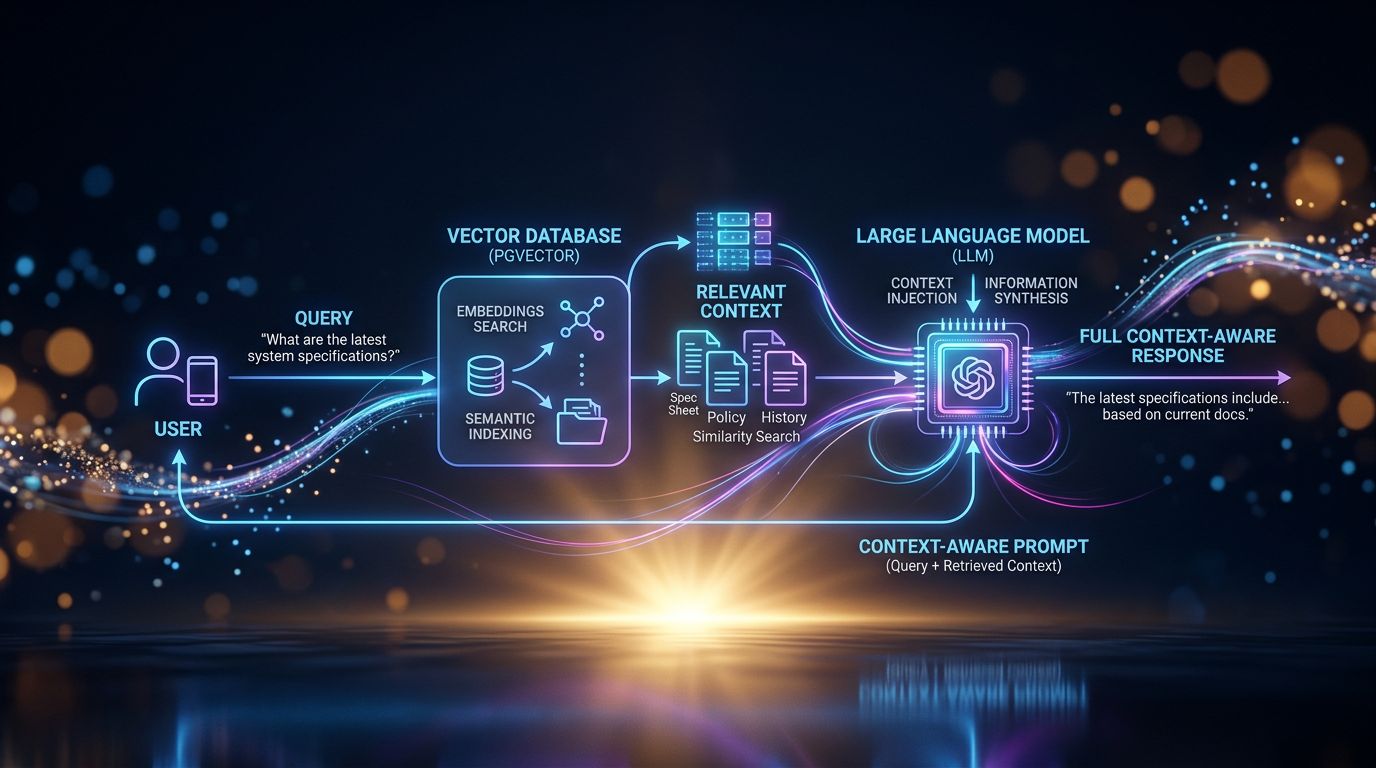
pgvector + embeddings: the stack that gives your AI a memory
What “AI productivity tips” articles never tell you: the real difference between a basic AI assistant and a professional AI assistant is the persistence layer.
Here’s the concrete stack.
pgvector is a PostgreSQL extension that lets you store and search vector embeddings. An embedding is the mathematical representation of text — a list of numbers that captures the semantic meaning of the content. Two similar sentences will have close embeddings in vector space.
The workflow works like this: every important piece of information (client file, project note, communication preference, decision made) is converted into an embedding and stored in pgvector. When you ask a question, the system performs a semantic search — not by keywords, by meaning — and retrieves the most relevant information. This information is injected into the prompt before the AI responds.
Result: the AI “knows” who your client Bertrand is without you needing to remind it.
It’s not magic. It’s engineering.
“Memory isn’t a feature of the AI — it’s a feature of the infrastructure surrounding it.”
Experience has taught me that memory quality depends directly on the quality of stored data. Garbage in, garbage out. If your client files are vague, your AI will be vague. If they’re precise, structured, up-to-date — your AI becomes a collaborator who truly knows your business.
What it concretely changes for a freelancer or agency
My analysis reveals three major operational gains — measurable, concrete.
The zero brief. No more “remind me of this project’s context.” The assistant already knows the client, their industry, their communication quirks, their budget constraints, the decisions made during the last three meetings. You go straight to the value-added work.
Cross-session consistency. You decided in January to always send quotes on Thursdays. In March, your assistant still remembers. Not because it’s intelligent — because that information is in its vector memory, automatically retrieved when the context requires it.
Asynchronous work. Here’s the point few people realize. An AI with persistent memory can work for you when you’re not there. Analyzing patterns, preparing briefs, detecting opportunities in your CRM — because it has the necessary context to act relevantly.

Let’s do the math. With 10 active clients, if you save 8 minutes of context per interaction and average 3 AI interactions per client per week — that’s 4 hours recovered every week. 16 hours per month. That’s 2 working days per month you can bill or simply not work.
The MCP protocol: controlling your AI memory from Claude Desktop
But beware of the trap. Having a vector database is good. Being able to query it naturally from your usual AI interface is better.
That’s where the MCP protocol (Model Context Protocol), developed by Anthropic, comes in. MCP is a standard that allows external tools to integrate directly into Claude Desktop — by exposing functions that Claude can call transparently during the conversation.
In practice: you open Claude Desktop, ask a question about client Martine Dubois, and Claude automatically queries your pgvector database via MCP to retrieve her file, the history of your exchanges, current projects. All without you having to copy-paste anything.
36 MCP tools. That’s the number of integrations available in Nova-Mind to control the assistant from Claude Desktop. Project management, CRM, notes, tasks — all accessible via natural language, with vector memory running in the background.
“The best AI workflow is the one you don’t need to actively manage.”
What nobody tells you: MCP changes the nature of interaction with AI. You go from a chatbot you question to a collaborator you delegate to. The nuance is enormous from an operational standpoint.
The three classic mistakes when trying to give your AI memory
Let’s look at this from another angle. After observing dozens of freelancers and agencies attempting to implement AI memory, here are the most frequent failure patterns.
Mistake 1: storing too much without structuring. Dumping all your emails into a vector database doesn’t create memory — it creates noise. Semantic search returns what’s close, not what’s important. Data structure matters as much as volume.
Mistake 2: neglecting updates. Memory that doesn’t update is worse than zero memory. The AI will act on outdated information with total confidence. Result: contextual errors that are hard to detect.
Mistake 3: confusing memory with session context. Injecting 50,000 tokens of context into every prompt isn’t memory — it’s overload. True vector memory is selective: it retrieves only what’s relevant to the current query. It’s the difference between a collaborator who knows everything and a collaborator who knows what you need right now.
Impact. These three mistakes explain why the majority of DIY AI memory attempts fail or remain anecdotal.
What it looks like in practice with Nova-Mind
Concretely, here’s the workflow I built and use daily.
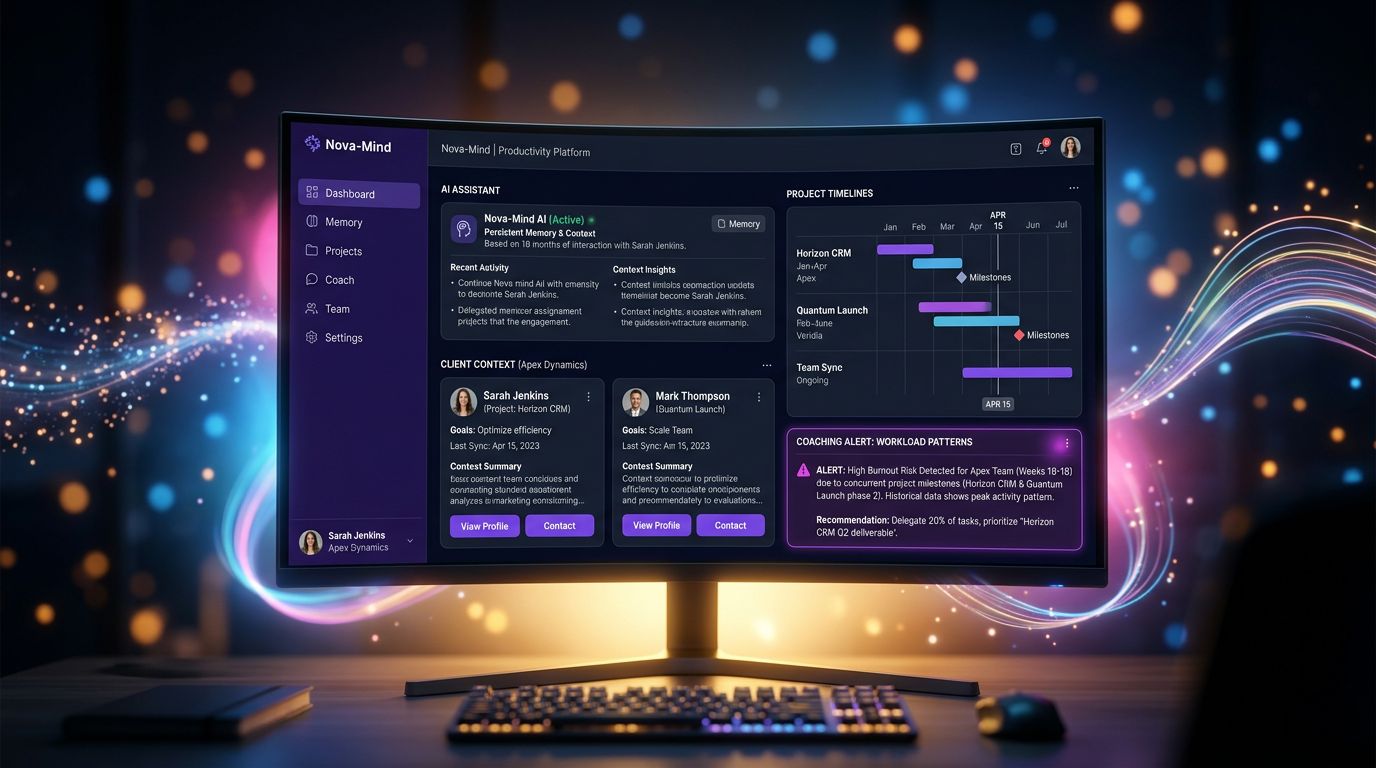
Each client has a structured file in the CRM — industry, contacts, project history, specific constraints, preferred communication tone. These files are vectorized in real time into pgvector via Supabase.
When I interact with Nova (the integrated AI assistant), she automatically queries this database based on my question’s context. If I’m discussing a web project for an industrial SME, she already knows that this client prefers deliverables in PDF, has a tight budget on phase 2, and that their CTO is hard to reach on Fridays.
Cerebro’s proactive coaching goes further: even when I’m not connected, the system analyzes my work patterns, detects if I’m underestimating a recurring workload, and prepares contextual suggestions for the next session.
$39/month. Data privately hosted on Supabase. Native desktop app on macOS, Windows, and Linux.
This isn’t a gimmick. It’s a work infrastructure.
Three takeaways before taking action
If you had to remember three things from this article:
-
AI memory is not a native LLM feature — it’s an infrastructure layer to build with pgvector and embeddings. Without it, you’re re-explaining context forever.
-
Quality trumps quantity — 20 well-structured client files are worth more than 500 raw emails in a vector database. Retrieval relevance depends on data quality.
-
MCP changes the nature of interaction — going from a chatbot to a contextualized collaborator isn’t a cosmetic change, it’s an operational change measured in hours recovered every week.
The next step
You have two options.
Build the pgvector + embeddings + MCP stack yourself. It’s doable if you’re comfortable with PostgreSQL and embedding APIs. Allow 2 to 3 weeks of configuration for a functional result, plus ongoing infrastructure maintenance.
Or use Nova-Mind, where all of this is already in place, integrated, and operational from day one. Vector memory, the MCP protocol, CRM, project management — all in a single tool for $39/month.
The choice depends on your technical appetite and how much you value your time.
But ask yourself this question: what are 4 hours recovered per week worth in your business?
Try Nova-Mind and start working with an assistant that finally remembers everything.
Share this article
Social networks
Analyze with AI

Charles Annoni
Front-End Developer and TrainerCharles Annoni has been helping companies with their web development since 2008. He is also a trainer in higher education.